
DitLead
Home/Analytics
Analytics

See what turns outreach into conversations.

Compare your audience, contacted prospects, replies and deals in one workspace. Use the results to decide which campaign deserves your next improvement.

  • Compare campaign audiences and reply rates
  • Filter by date and email or LinkedIn channel
  • Review engagement, bounces and unsubscribes
  • Switch between campaign, deal and task reporting
7-day trial · Credit card required · Cancel anytime
Campaign · "Series B SaaS · Q3"Reply rate 8.5%
SENT
42,184
OPENS
71%
REPLIES
8.5%
BOOKED
94
MonTueWedThuFriSatSun
In the product

From audience to reply, in one view.

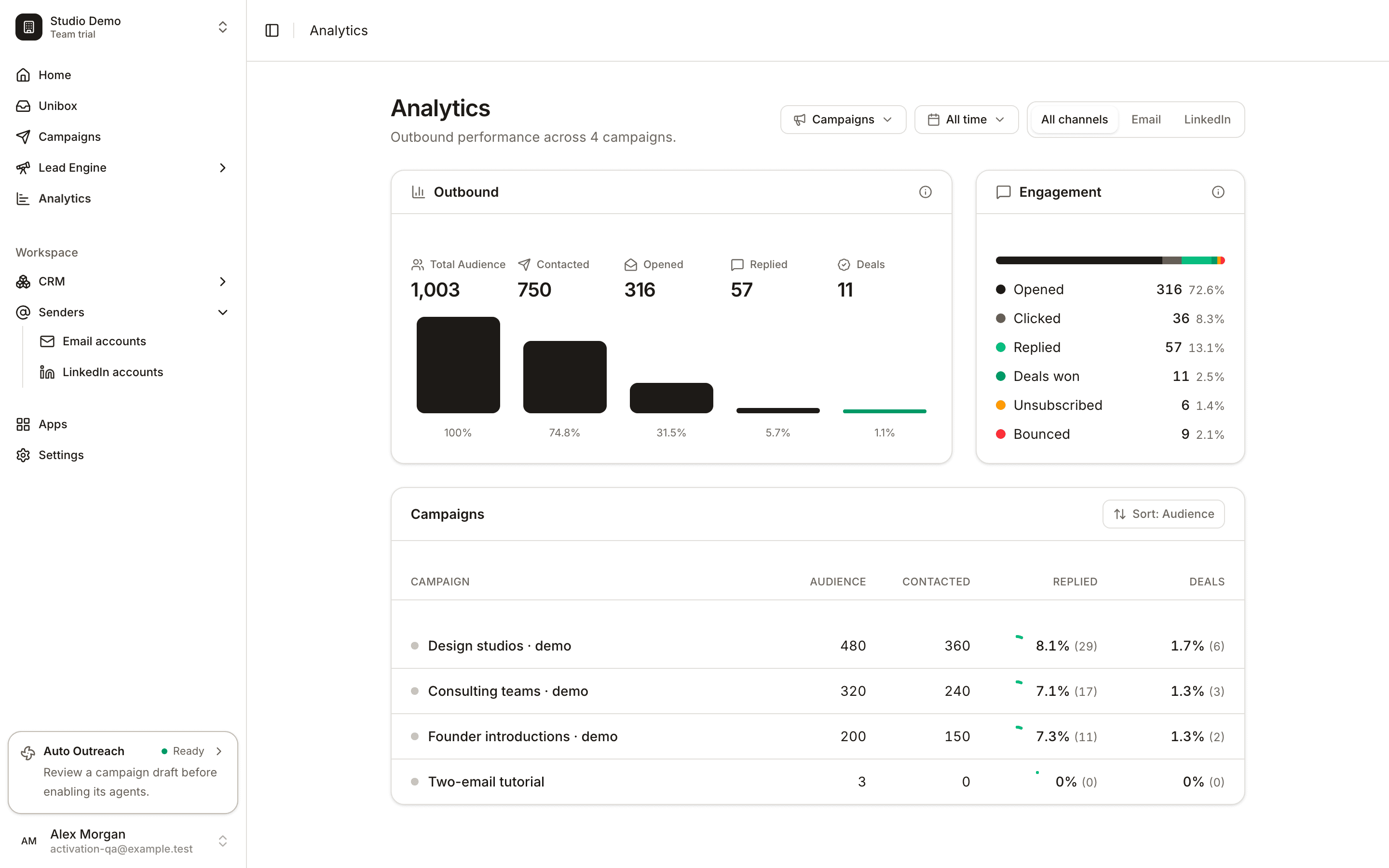
The current DitLead analytics dashboard shows the outbound funnel, engagement breakdown and campaign comparison. Figures shown are synthetic demonstration data.
app.ditlead.com/analytics
DitLead analytics with audience, contacted, opened, replied and deals, plus labeled demo campaigns
In your workspace

Make the next step clear.

FEAT / 01

Find the drop-off

Follow the funnel from your audience through contacted prospects, opened messages, replies and deals.

FEAT / 02

Compare a useful segment

Choose a time window and channel so the comparison matches the question you are trying to answer.

FEAT / 03

Look beyond opens

Review replies and deals alongside opens. A promising campaign should create conversations you can act on.

FEAT / 04

Watch delivery signals

Check bounces and unsubscribes before increasing volume. Pair the report with your campaign logs and mailbox status.

How it works

A practical workflow.

STEP / 01

Choose your view

Open Analytics, then select Campaigns, Deals or Tasks.

STEP / 02

Set the comparison

Choose your time period and channel. Compare campaigns with similar audiences and offers.

STEP / 03

Improve one part

Use the results to adjust targeting, message or sending setup, then compare the next period.

FAQ3 entries

Analytics, explained

Talk through your workflow with our team.

Talk to sales

Campaign reporting includes time-period and email or LinkedIn channel filters. Campaigns can be sorted by the available performance metrics.

No. Use opens as a supporting signal and judge results alongside replies, delivery signals and conversations.

No. The screenshot uses labeled synthetic campaigns in a development workspace to explain the reporting layout.

Related capabilities3 reads

Put it into practice.

See all features
PLATE · CTAstart nowfig.
Start with your workspace

Build your next outreach campaign.

Bring your audience, connect a sender and prepare a message you can review before publishing.

7-day trial·Credit card required·Cancel anytime